Showing posts with label database. Show all posts

Thursday, February 29, 2024

Breaking up with SQL Server

I was inspired to write this after reading a post from Dave Mason regarding breaking up with Big Tech companies. Yet again I haven't wrote for some time, my last post was about the release of SQL Server 2022 which I felt was rather underwhelming and certainly not helped by some of the issues with it.

It also came at a funny time in my career. For anyone who doesn't know me I've worked with SQL Server for many years and from my own perspective have had quite a remarkable career when I think back to my early days dabbling with MS Access. What followed those early days was a long journey developing and honing my skills after completely by accident falling into the wonderful world of SQL Server overnight, and it became my dedication.

But a couple of years ago things changed. At the time I was an avid blogger and occasional presenter who lived and breathed SQL Server as anyone who knows me well enough would testify. Unfortunately there were some things going on in my personal life which meant I had to stop a lot of those activities. I was still working but the blogs and everything else just stopped, and weirdly after a short time I realised that I didn't really miss any of it either. I definitely tried; I wrote a few blog posts here and there, I even put together a couple of new sessions but just couldn't seem to get that spark back to really get back into it.

Which leads me to the breaking up part...and I have to start off by saying, SQL Server...it's not you, it's me!

I know, I rolled my eyes a little too but I'm going to be even more cliché, deep down I do still love [working with] SQL Server, we've been in a relationship for a long time but over time things and people change. There's just something that isn't there any more and to be truthful, it's time I moved on.

OK, that's enough of the technical equivalent of a Dear John letter as I was getting emotional.

The fact is that whilst I'll still be working with SQL for sure I realised I do actually miss the blogging, the speaking and the rest of it, it's just the subject matter that I had grown tired of and so it's time for something a little different.

Over the last couple of years I've been working with some different platforms and technologies; AWS, GCP, PostgreSQL, Python and a whole bunch of other stuff. It's not just me of course, this is how the technical landscape is these days so if anything it was very natural I suppose to diversify my technical knowledge and skill set. But when it comes to really getting into a technology I'm shifting focus specifically towards some of those areas and reigniting what I once had, and it's been a while since I said this, but I can't wait to see how things develop :-)

Tuesday, May 30, 2023

SQL Server 2022

It's been almost a year since I blogged about anything so it's probably about time that I blew the dust off the keyboard and got back into action!

In the tech world a lot has been happening whilst I've been away and in the world of SQL Server the biggest "thing" has certainly been the release of the very latest version, SQL Server 2022. So let me get straight to the point, in my very humble opinion, it's also the most underwhelming release of SQL Server that I've ever known.

If I think about my favourite version (because we've all got one...don't we?!!?) then SQL Server 2016 gets my vote, that and 2005. In between those two we've had other releases and new features etc but those definitely stick out and let's be real, SP1 for 2016 meant those standard users amongst us got to use some fun stuff at long last without forking out for Enterprise licences!

For more recent releases starting with SQL Server 2017 we had the whole Microsoft loves Linux fanfare and being the "platform of choice". Yes there were other things too like machine learning, adaptive query processing (which I do like the idea of) and, er, resumable online index rebuilds but this release was all about the idea of the platform. 

And then 2019 came along with the vision for the Modern Data Platform and using the word BIG at every opportunity. Speaking of which Microsoft also bet BIG on Kubernetes with the introduction of the aptly named Big Data Clusters, which were subsequently canned, so much for quenching our thirst:

"Our mission is to accelerate, delight, and empower our users as they quench their thirst for data driven insights. The Microsoft SQL Server 2019 Big Data Clusters add-on will be retired. Support for SQL Server 2019 Big Data Clusters will end on February 28, 2025."

At least TDE came to standard edition at long last!

Anyway it seems to me that 2022 was a play it safe kind of release. There's no super bold moves, nothing to get really thirsty about anyway and whilst I have to admit I did roll my eyes at the whole "most Azure enabled release" tagline there's some handy features in there like the Managed Instance link. Sadly it isn't ready yet for any bi-directional replication (and with that Disaster Recovery capabilities) and it's still stuck in Public Preview!

Was it a rushed release? Undoubtedly, and unfortunately there's problems further down the Cumulative Update conga line as well which Brent has recently blogged about: Breaking News: SQL Server 2022 Keeps Getting Worse. - Brent Ozar Unlimited®

Urgh.

Now I should point something out. When I said SQL Server 2022 is an underwhelming release that isn't necessarily a bad thing, particularly when you look at the whole big data clusters [bad] idea and I for one will certainly take an underwhelming release any day of the week as long as it works. But I can't help but agree with Brent's article title that as of right now, it's a release that is seemingly getting worse, and that is what really disappoints.

But let's not end on a sour note because I do like SQL Server 2022, or at least if I put aside current issues, the idea of it. 

Cynical eye rolls aside I actually like the approach of SQL Server being more Azure enabled. Although it has limitations the Synapse link looks interesting, although tbh I am not a Synapse user so can't comment too much, although I did chuckle that enabling Azure Synapse Link and Link to Managed Instance isn't supported on the same database (but I can see why that's the case). 

To me it's like Microsoft are going back to building on the strengths of SQL Server and leveraging some of the benefits of Azure at the same time and that's not a bad thing, at least, when it's all ready that will hopefully be the case.

Tuesday, March 8, 2022

Watching Optimisation Phases with Trace Flag 8675

When a query is executed a few things happen; the query is parsed, a logical tree of the query is created, the query is simplified and then the optimiser determines if a trivial plan can be used. If a trivial plan can't be used, essentially if the optimiser has to figure out the optimal execution plan (such as making decisions on joins) then the query is passed to the full optimisation stage.

The full optimisation stage is where the optimiser uses a bag of tricks to optimise our query (surprise, surpise), well technically it has three bags of tricks that are named optimisation phases that each contain a collection of transformation rules (which I cover in this post that you should never do). The optimiser is not limited to using just one of the phases and each has a set criteria which determines if the optimiser can use that particular phase.

In order to see what how the optimiser is using these phases we need to enable Trace Flag 8675 as well as Trace Flag 3604 which will redirect the output to the query messages tab in Management Studio:

DBCC TRACEON(8675, -1); 

DBCC TRACEON(3604, -1);

Let's start with a very straightforward query on the AdventureWorks2019 sample database and for each of the queries we can actually run them or show the estimated execution plan which will still use the query optimisation process:

SELECT * FROM Person.Person OPTION (RECOMPILE);

Which when I check the output in the messages tab I can the following:

End of simplification, time: 0 net: 0 total: 0 net: 0

End of post optimization rewrite, time: 0 net: 0 total: 0 net: 0.001

End of query plan compilation, time: 0 net: 0 total: 0 net: 0.001

For this query we don't see any information relating to optimisation phases, that's expected because for this query the optimiser has used a trivial plan, which we can check in the plan properties:


If we re-run the query excluding the OPTION (RECOMPLILE) and again check the messages tab we don't see anything in the messages tab this time. This is because the query has been retrieved from the plan cache or procedure cache as it is also known. 

Now I'll add a join to the query to give the optimiser something to think about and use the RECOMPILE option to ensure the query is not retrieved from cache:

SELECT * FROM Person.Person per
INNER JOIN Sales.Customer cus ON cus.PersonID = per.BusinessEntityID
OPTION (RECOMPILE);

This time in the messages output we can see a line for search(1) which is also knowns as the Quick Plan optimisation phase:

End of simplification, time: 0.002 net: 0.002 total: 0 net: 0.002

end exploration, tasks: 57 no total cost time: 0.001 net: 0.001 total: 0 net: 0.004

end search(1),  cost: 3.99696 tasks: 211 time: 0.002 net: 0.002 total: 0 net: 0.006

End of post optimization rewrite, time: 0 net: 0 total: 0 net: 0.006

End of query plan compilation, time: 0 net: 0 total: 0 net: 0.007

Here we can see that the optimiser has produced an execution plan with a cost of 3.9969 and I can check that against either the estimated or actual plan in management studio by hovering over the left most operator (in this case the Select) and checking the Subtree cost, the below image is from the estimated plan showing the estimated cost to be 3.99696


In order to demonstrate the optimiser using multiple phases I'll add a join to another table. There is another optimisation phase, search(0) named Transaction Processing where the transformation rules are used for OLTP type queries. The optimiser didn't start with search(0) for our previous query because there has to be at least three tables used in the query in order for the optimiser to use this particular phase.

SELECT * FROM Person.Person per
INNER JOIN Sales.Customer cus ON cus.PersonID = per.BusinessEntityID
INNER JOIN Sales.SalesOrderHeader soh ON soh.CustomerID = cus.CustomerID 
OPTION (RECOMPILE);

Again using the RECOMPILE this time we're using three tables in the query (Person.Person, Sales.Customer and Sales.SalesOrderHeader) and if we look at the message output after the query has executed we can see the use of two optimisation phases; search(0) and search(1) and corresponding time that the optimiser has spent in each phase:

End of simplification, time: 0.004 net: 0.004 total: 0 net: 0.004

end exploration, tasks: 71 no total cost time: 0.005 net: 0.005 total: 0 net: 0.01

end search(0),  cost: 14.5642 tasks: 386 time: 0.008 net: 0.008 total: 0 net: 0.018

end exploration, tasks: 572 Cost = 14.5642 time: 0.002 net: 0.002 total: 0 net: 0.021

end search(1),  cost: 6.57863 tasks: 1027 time: 0.01 net: 0.01 total: 0 net: 0.031

End of post optimization rewrite, time: 0 net: 0 total: 0 net: 0.032

End of query plan compilation, time: 0.002 net: 0.002 total: 0 net: 0.035

The interesting thing here is the cost difference between the optimisation phases, the search(0) phase returned a query plan with a cost of 14.5642 however by using the search(1) phase the query has used a plan with an associated cost of 6.57863 which is a clear improvement.

There is another phase, stage(2) which is the full optimisation phase that contains every single transformation rule available. I'll cover that in a forthcoming post and in the meantime I'll write a horrible enough query to use that phase and we'll look into optimiser timeouts as well.

Trace Flag 8675 is one of those little known trace flags (IMO) that gives us some in-depth information on how the query optimiser is working. 

To finish off, to disable the trace flags I should now run the following: 

DBCC TRACEOFF(8675, -1); 

DBCC TRACEOFF(3604, -1);

Monday, March 7, 2022

Database offline worked fine, database online didn't!

I was browsing the SQL Server subreddit earlier where someone had posted a problem where they'd been able to take a database offline but couldn't bring the database back online via a script or the UI in SSMS (full thread here).

There's a bit of a back story; all the DBA's have left the business (facepalm) so a non-DBA has been left with the admin type tasks. Secondly the reason the database was being taken offline was to take physical backups of the databases mdf and ldf files (double facepalm).

Anyway, on the issue itself. My first thought was permissions, because it always is...or at least we can't blame DNS this time. But I had a slight doubt, surely if you had permissions to take a database offline you can bring it back?

Well, nope.

Being a member of the db_owner role will give you the required access to take a database offline. I'm going to test it on my machine as we go along:

CREATE LOGIN [supertester] WITH PASSWORD=N'MEG4PASSword.77', DEFAULT_DATABASE=[master], DEFAULT_LANGUAGE=[us_english], CHECK_EXPIRATION=OFF, CHECK_POLICY=OFF

GO

Then I'll change database context to my imaginatively named Test database and add the supertester user and add it to the db_owner role:

USE Test

GO

CREATE USER [supertester] FOR LOGIN [supertester];

EXEC sp_addrolemember N'db_owner', N'supertester';

I've logged into SSMS as the supertester login, the first thing I want to try is taking the database offline but I'm going to select to Drop All Active Connections:


I get the following error on VIEW SERVER STATE permissions being denied:


However, if I run the following T-SQL command the database successfully goes offline:

ALTER DATABASE Test SET OFFLINE WITH ROLLBACK IMMEDIATE; 

So, supertester has been able to offline the Test database, now to bring it back:

ALTER DATABASE Test SET ONLINE;

Unfortunately I'm greeted by the following red text:

Msg 5011, Level 14, State 9, Line 1

User does not have permission to alter database 'Test', the database does not exist, or the database is not in a state that allows access checks.

Msg 5069, Level 16, State 1, Line 1

ALTER DATABASE statement failed.

Oh dear...or words to that effect, db_owner role members can take databases offline but not bring the databases back online again. In this case it's going need elevated permissions, either ALTER ANY DATABASE being granted or maybe sysadmin role membership, especially if they're going to be taking on more admin type activities in the future.

The final note has to be about this whole scenario. I really feel for accidental/reluctant DBA's who are tasked (or rather thrown in to the deep end) with all kinds of activities without any support whatsoever. This is a perfect example where someone has been following instructions (admittedly they make no sense) without any real understanding and through no fault of their own has ended up in what could be a critical situation.

Yes, let's of people jumped into the thread to help which is awesome, and you know it's such a great thing about the SQL community that people are always willing to help but this is something that could have been avoided.

Finally I'll drop the supertester user and login because they're always up to no good.

Friday, March 4, 2022

Azure SQL Managed Instance - Configure Managed Instance Disabled

Quick post on an issue I encountered earlier when trying to create a new Azure SQL Managed Instance on a brand new Azure subscription. Unfortunately I can't recreate the problem as I fixed it manually and things have worked as expected ever since so you'll have to take my word for it!

The problem I had when creating a new SQL Managed Instance was that the Configure Managed Instance was disabled (the following image shows what it should look like) and I wanted to reduce the compute of the new managed instance:

What I also found on the following Networking screen was that the Virtual network/subnet option was stuck at loading and this needs to be complete to allow configuration of the Managed Instance, in fact it won't even create the resource without this option completed:


To resolve the issue I had to create a brand Virtual Network resource in the Portal which I could then select from the dropdown list when I tried to create a Managed SQL Instance again. I then deleted the new Virtual Network and went back to see if the problem would reoccur and was correctly given the new option as shown in the image above.

So if you are creating this type of resource with no Virtual Network you might run into this problem and would need to create the Virtual Network first! Not sure if anyone else has ran into this?!

Azure Data Studio - Azure SQL Migration Extension SKU Recommendations

Microsoft recently announced the Public Preview of SKU recommendations in the Azure SQL Migration extension in Azure Data Studio. This enables us to use a performance assessment on our databases to provide us with correct sizing for an Azure SQL Managed Instance (or Azure SQL VM).

I'm using the latest version, 1.35.0 which you can download from here and if you're wondering what Azure Data Studio is, you can find out more information from this link.

The Azure SQL Migration extension is available to install via the extensions marketplace:


To perform a migration you will need Azure account details but if you're just performing an assessment like we are in this post then they're not required. Once installed we use the Manage option on an available connection as follows:


This opens up a new screen which shows some basic information about the selected SQL instance, under General the Azure SQL Migration option will now be available:


This will open the Azure SQL Migration screen, one of the things I love about Azure Data Studio is its interactivity options; we can link an Azure account from here, view migration tutorials and even open a support request but for now we'll proceed with the assessment process:


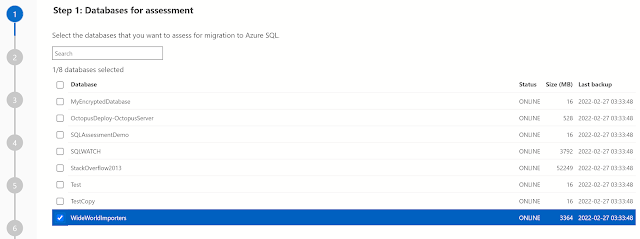
We'll now be presented with the databases on our selected instance that we wish to assess for migration, I've selected the WideWorldImporters sample database:


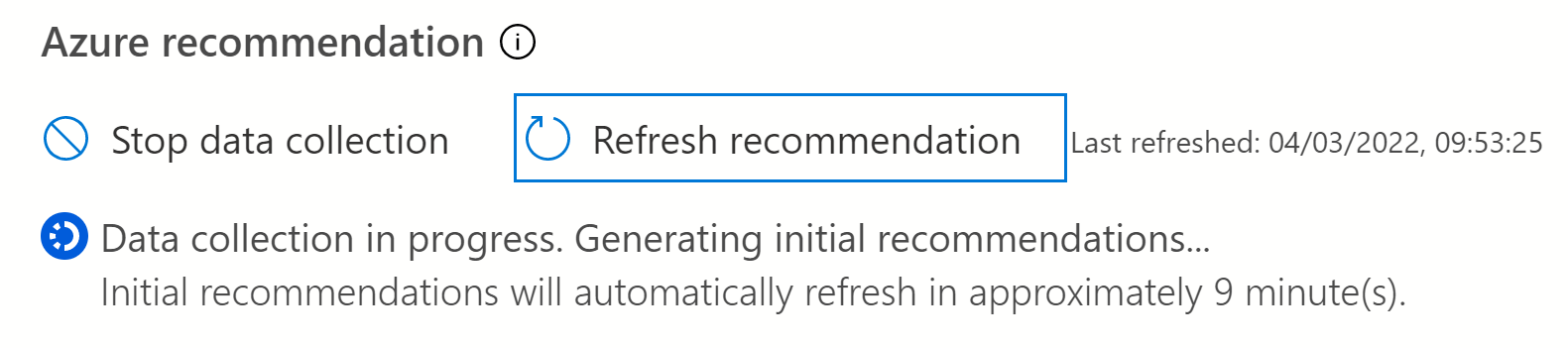
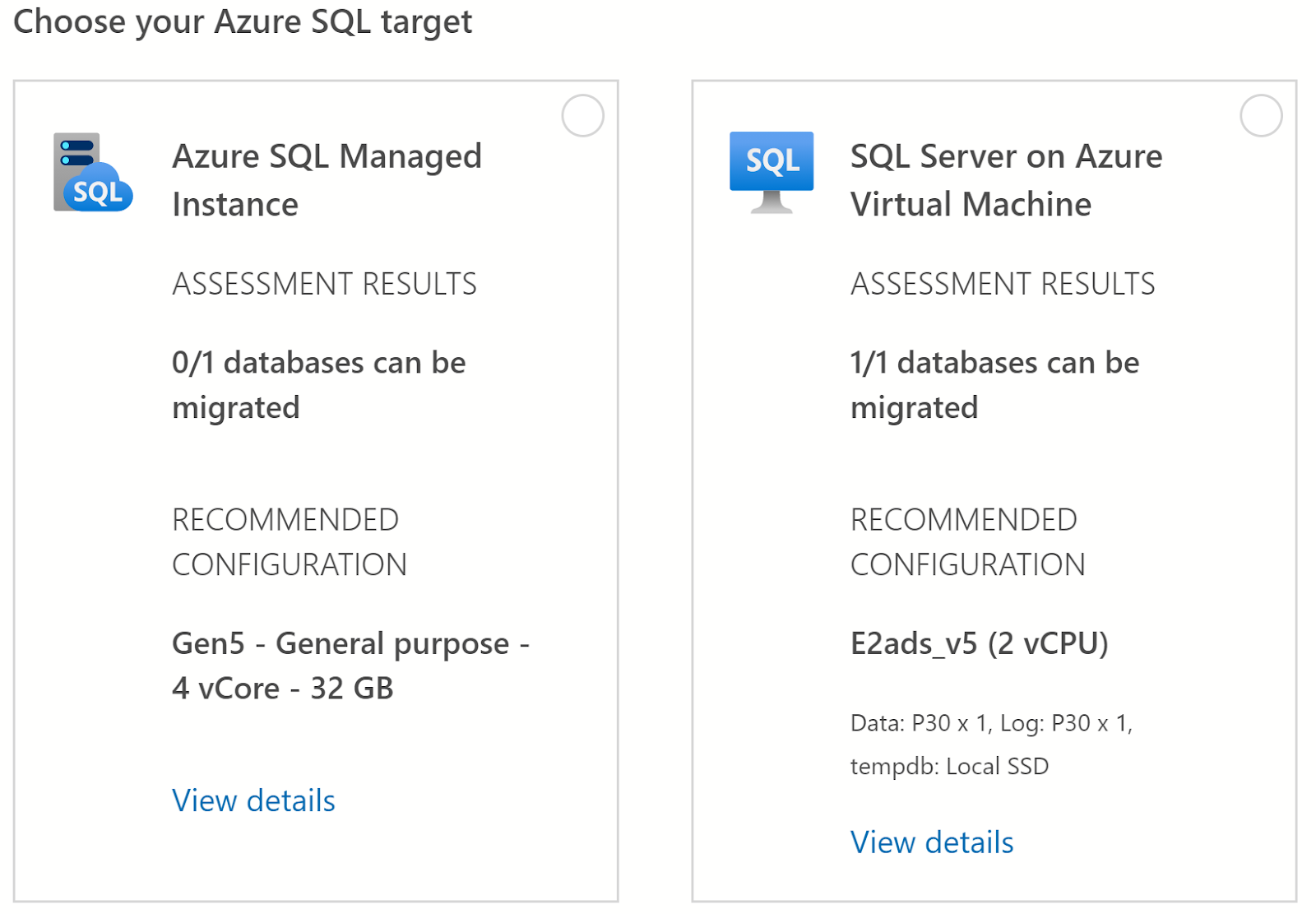
On the next screen we can see two migration options; Azure SQL Managed Instance and SQL Server on Azure Virtual Machine, at the bottom of the screen we'll click Get Azure Recommendation to start the performance data collection, as I haven't previously ran the collector I'll select Collect performance data now and specify a local folder where the data will be saved (once collected I can use the "I already have the performance data" option at a later time).


The data collector will run for about 10 minutes. It's worth mentioning that to be as accurate as possible the collector should be ran on "real life" workloads, if you run the collector during periods of low activity then the chances are the recommendations will be for a lower specification than what you might actually require in Azure. 


Once the data collection has completed the recommendations are automatically refreshed under each of the migration targets. In this case for Azure SQL Managed Instance it has recommended the Gen5 General Purpose 4 vCore option (32 GB) and for SQL Server on Azure Virtual Machine the E2ads_v5 2 vCPU option. 


But...

Under the Azure SQL Managed Instance option the assessment results show that 0/1 databases can be migrated. To see any issues I need to select the Managed Instance option and click Next (if you don't select a target you'll get a nice red banner telling you off).

I expected to go the the next screen but actually I couldn't and instead had to select a database and it's assessment button from this button at the bottom of the screen (in truth I found it a bit fiddly, but never mind):


The next screen shows that I have a potential migration issue on the WideWorldImporters database, I can select the database using the checkbox next to it to view the relevant information: 


Here's the problem:


In terms of performance data the recommendation is for the General Purpose service tier of Azure SQL Managed Instance however as the WideWorldImporters database makes use of in-memory tables these are not supported and is actually only supported on the Business Critical service tier.

But that's the whole point of a migration assessment tool, not only does the extension gauge database performance and recommend the correct SKU it also identifies potential migration issues such as unsupported functionality, and without a doubt the more you know beforehand the better!

Wednesday, January 26, 2022

Query Simplification: Join Removal with Foreign Keys

Foreign keys are used in database design to enforce referential integrity but they also have some performance benefits as well that you might not necessarily notice unless you're looking into your execution plans.

Let's take the following query using the AdventureWorks2019 sample database where I'm selecting the BusinessEntityID and JobTitle from the HumanResources.Employee table and by using an inner join I'm only returning rows that have matching values (BusinessEntityID) in both tables:

SELECT e.BusinessEntityID, e.JobTitle
FROM HumanResources.Employee e
INNER JOIN Person.Person p 
ON e.BusinessEntityID = p.BusinessEntityID;

I might expect to see an operator that performs the inner join in the execution plan but when I look at the plan this is what I get:

Plan 1: Index Scan on HumanResources.Empoyee


Despite my query containing a join to the Person.Person table the optimiser has used an execution plan that only contains a clustered index scan of the HumanResources.Employee table. Even though the join is there in our query text it hasn't been used in the plan at all.

The reason why the join isn't present in our first query is partly down to the columns which the query is returning. I'm only selecting two columns which are both from the employee table, if I were to add a column from the Person.Person table such as in the following query then I will get a very different execution plan:

SELECT e.BusinessEntityID, e.JobTitle, p.FirstName
FROM HumanResources.Employee e
INNER JOIN Person.Person p 
ON e.BusinessEntityID = p.BusinessEntityID;


Plan 2: Query with column from Person.Person

By adding this column (or indeed any column from the Person.Person table or even worse if I had used SELECT *) the execution plan has two additional operators; an index seek on the Person.Person table and this time a join operator (Nested Loop) is present in the plan. This is also a great example of why only selecting columns that you actually need in a query is really important otherwise you might be causing needless overhead.

The column selection has clearly influenced the optimisers plan selection and when referencing columns in the Person.Person table in the select the optimiser has had to come up with a plan containing the join, but why for our first query has it not done the same thing? 

In this example the join removal is made possible due to a foreign key relationship between the two tables on the BusinessEntityID column. Which if you're playing along in Management Studio you can see under the HumanResources.Employee table under keys (FK_Employee_Person_BusinessEntityID).

As our inner join is essentially returning matching values from both tables and the foreign key exists on those the values the optimiser already knows that the values are matched and in turn as we're not returning any values from the Person.Person table it can avoid the cost of the join and the scan operation on the Person.Person table altogether, but we'll still get the same results.

In order to test this I'm going to remove the foreign key with the following T-SQL and then re-run the first query:

ALTER TABLE [HumanResources].[Employee] DROP CONSTRAINT [FK_Employee_Person_BusinessEntityID]
GO

SELECT e.BusinessEntityID, e.JobTitle
FROM HumanResources.Employee e
INNER JOIN Person.Person p 
ON e.BusinessEntityID = p.BusinessEntityID;

This time although we're only selecting records from the employee table we get a very different query plan that is unable to take advantage of join removal and as such has to perform an index scan on both tables which are joined using the Hash Match operator. 

Plan 3: Query with no foreign key


Before I carry on I'll add the foreign key back with the following T-SQL:

ALTER TABLE [HumanResources].[Employee]  WITH CHECK ADD  CONSTRAINT [FK_Employee_Person_BusinessEntityID] FOREIGN KEY([BusinessEntityID])
REFERENCES [Person].[Person] ([BusinessEntityID])
GO

ALTER TABLE [HumanResources].[Employee] CHECK CONSTRAINT [FK_Employee_Person_BusinessEntityID]
GO

This is a great example of how foreign keys not only force referential integrity but they do have some less obvious performance benefits too that the optimiser can take advantage during query optimisation phases. 

Breaking up with SQL Server

I was inspired to write this after reading a post from Dave Mason regarding breaking up with Big Tech companies. Yet again I haven't wr...