Showing posts with label azure. Show all posts

Tuesday, May 30, 2023

SQL Server 2022

It's been almost a year since I blogged about anything so it's probably about time that I blew the dust off the keyboard and got back into action!

In the tech world a lot has been happening whilst I've been away and in the world of SQL Server the biggest "thing" has certainly been the release of the very latest version, SQL Server 2022. So let me get straight to the point, in my very humble opinion, it's also the most underwhelming release of SQL Server that I've ever known.

If I think about my favourite version (because we've all got one...don't we?!!?) then SQL Server 2016 gets my vote, that and 2005. In between those two we've had other releases and new features etc but those definitely stick out and let's be real, SP1 for 2016 meant those standard users amongst us got to use some fun stuff at long last without forking out for Enterprise licences!

For more recent releases starting with SQL Server 2017 we had the whole Microsoft loves Linux fanfare and being the "platform of choice". Yes there were other things too like machine learning, adaptive query processing (which I do like the idea of) and, er, resumable online index rebuilds but this release was all about the idea of the platform. 

And then 2019 came along with the vision for the Modern Data Platform and using the word BIG at every opportunity. Speaking of which Microsoft also bet BIG on Kubernetes with the introduction of the aptly named Big Data Clusters, which were subsequently canned, so much for quenching our thirst:

"Our mission is to accelerate, delight, and empower our users as they quench their thirst for data driven insights. The Microsoft SQL Server 2019 Big Data Clusters add-on will be retired. Support for SQL Server 2019 Big Data Clusters will end on February 28, 2025."

At least TDE came to standard edition at long last!

Anyway it seems to me that 2022 was a play it safe kind of release. There's no super bold moves, nothing to get really thirsty about anyway and whilst I have to admit I did roll my eyes at the whole "most Azure enabled release" tagline there's some handy features in there like the Managed Instance link. Sadly it isn't ready yet for any bi-directional replication (and with that Disaster Recovery capabilities) and it's still stuck in Public Preview!

Was it a rushed release? Undoubtedly, and unfortunately there's problems further down the Cumulative Update conga line as well which Brent has recently blogged about: Breaking News: SQL Server 2022 Keeps Getting Worse. - Brent Ozar Unlimited®

Urgh.

Now I should point something out. When I said SQL Server 2022 is an underwhelming release that isn't necessarily a bad thing, particularly when you look at the whole big data clusters [bad] idea and I for one will certainly take an underwhelming release any day of the week as long as it works. But I can't help but agree with Brent's article title that as of right now, it's a release that is seemingly getting worse, and that is what really disappoints.

But let's not end on a sour note because I do like SQL Server 2022, or at least if I put aside current issues, the idea of it. 

Cynical eye rolls aside I actually like the approach of SQL Server being more Azure enabled. Although it has limitations the Synapse link looks interesting, although tbh I am not a Synapse user so can't comment too much, although I did chuckle that enabling Azure Synapse Link and Link to Managed Instance isn't supported on the same database (but I can see why that's the case). 

To me it's like Microsoft are going back to building on the strengths of SQL Server and leveraging some of the benefits of Azure at the same time and that's not a bad thing, at least, when it's all ready that will hopefully be the case.

Friday, March 4, 2022

Azure SQL Managed Instance - Configure Managed Instance Disabled

Quick post on an issue I encountered earlier when trying to create a new Azure SQL Managed Instance on a brand new Azure subscription. Unfortunately I can't recreate the problem as I fixed it manually and things have worked as expected ever since so you'll have to take my word for it!

The problem I had when creating a new SQL Managed Instance was that the Configure Managed Instance was disabled (the following image shows what it should look like) and I wanted to reduce the compute of the new managed instance:

What I also found on the following Networking screen was that the Virtual network/subnet option was stuck at loading and this needs to be complete to allow configuration of the Managed Instance, in fact it won't even create the resource without this option completed:


To resolve the issue I had to create a brand Virtual Network resource in the Portal which I could then select from the dropdown list when I tried to create a Managed SQL Instance again. I then deleted the new Virtual Network and went back to see if the problem would reoccur and was correctly given the new option as shown in the image above.

So if you are creating this type of resource with no Virtual Network you might run into this problem and would need to create the Virtual Network first! Not sure if anyone else has ran into this?!

Azure Data Studio - Azure SQL Migration Extension SKU Recommendations

Microsoft recently announced the Public Preview of SKU recommendations in the Azure SQL Migration extension in Azure Data Studio. This enables us to use a performance assessment on our databases to provide us with correct sizing for an Azure SQL Managed Instance (or Azure SQL VM).

I'm using the latest version, 1.35.0 which you can download from here and if you're wondering what Azure Data Studio is, you can find out more information from this link.

The Azure SQL Migration extension is available to install via the extensions marketplace:


To perform a migration you will need Azure account details but if you're just performing an assessment like we are in this post then they're not required. Once installed we use the Manage option on an available connection as follows:


This opens up a new screen which shows some basic information about the selected SQL instance, under General the Azure SQL Migration option will now be available:


This will open the Azure SQL Migration screen, one of the things I love about Azure Data Studio is its interactivity options; we can link an Azure account from here, view migration tutorials and even open a support request but for now we'll proceed with the assessment process:


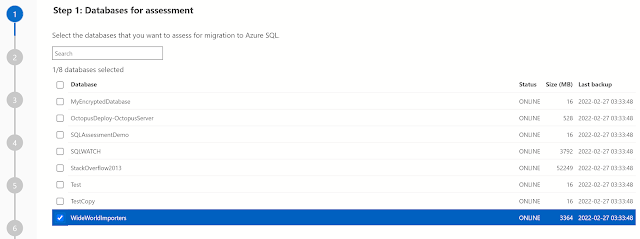
We'll now be presented with the databases on our selected instance that we wish to assess for migration, I've selected the WideWorldImporters sample database:


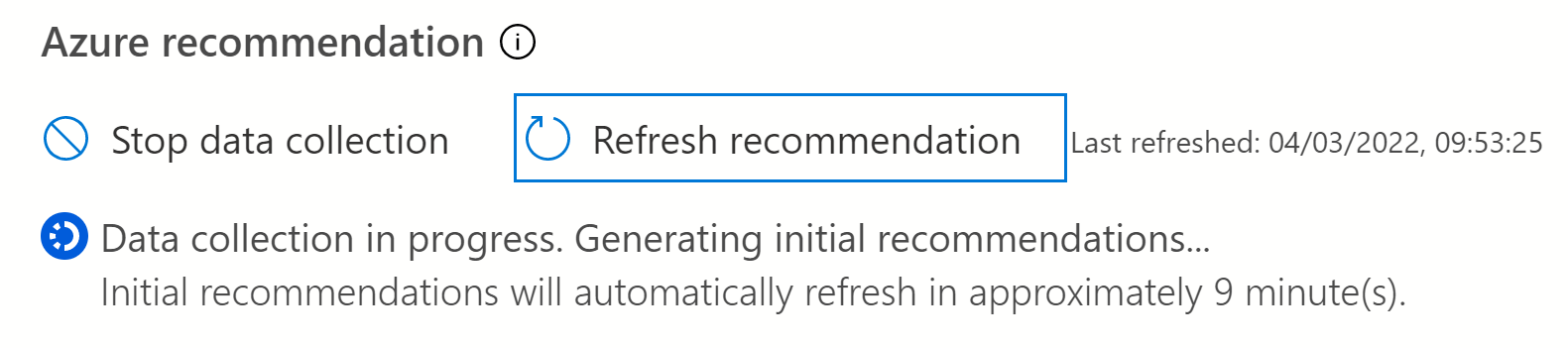
On the next screen we can see two migration options; Azure SQL Managed Instance and SQL Server on Azure Virtual Machine, at the bottom of the screen we'll click Get Azure Recommendation to start the performance data collection, as I haven't previously ran the collector I'll select Collect performance data now and specify a local folder where the data will be saved (once collected I can use the "I already have the performance data" option at a later time).


The data collector will run for about 10 minutes. It's worth mentioning that to be as accurate as possible the collector should be ran on "real life" workloads, if you run the collector during periods of low activity then the chances are the recommendations will be for a lower specification than what you might actually require in Azure. 


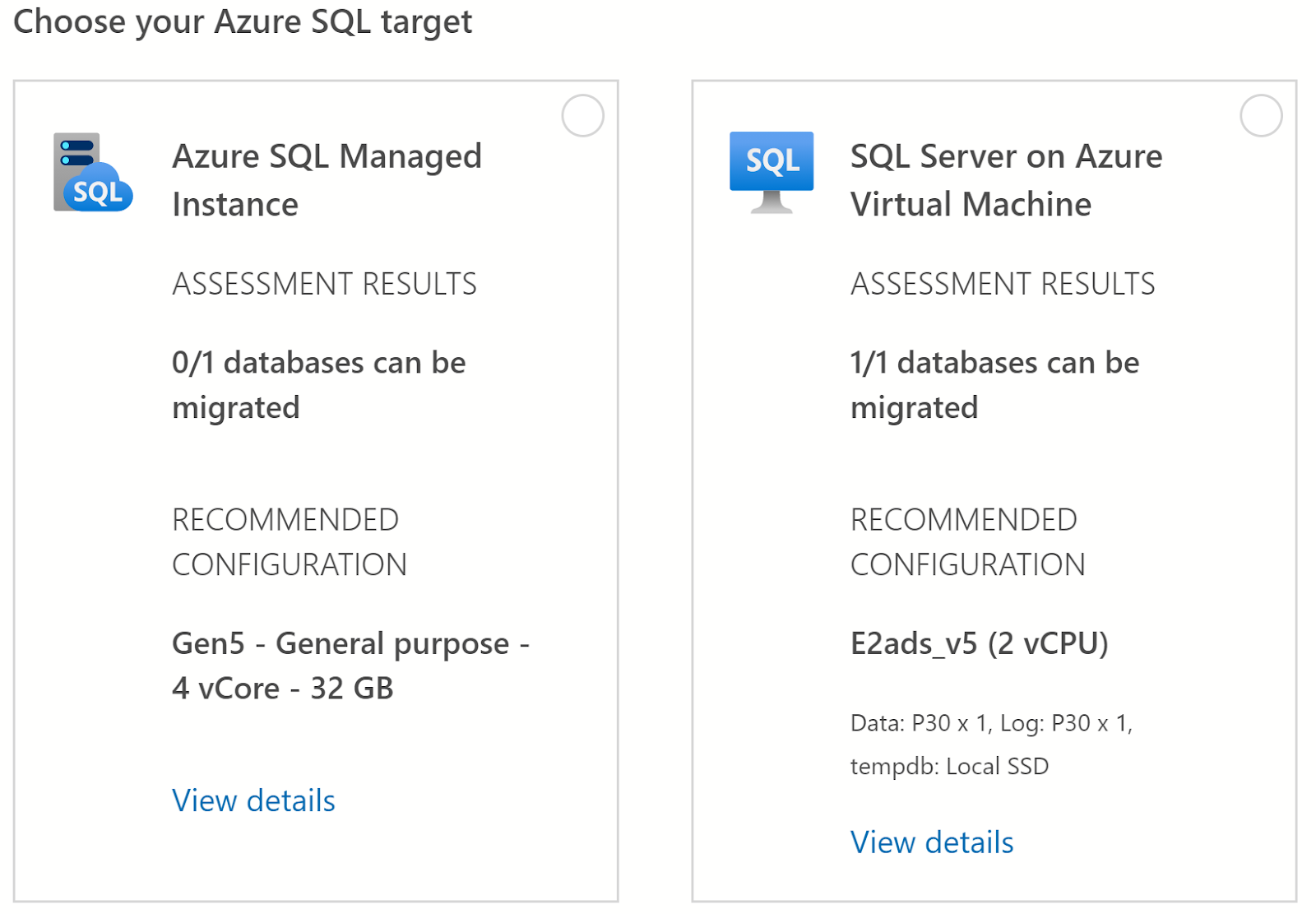
Once the data collection has completed the recommendations are automatically refreshed under each of the migration targets. In this case for Azure SQL Managed Instance it has recommended the Gen5 General Purpose 4 vCore option (32 GB) and for SQL Server on Azure Virtual Machine the E2ads_v5 2 vCPU option. 


But...

Under the Azure SQL Managed Instance option the assessment results show that 0/1 databases can be migrated. To see any issues I need to select the Managed Instance option and click Next (if you don't select a target you'll get a nice red banner telling you off).

I expected to go the the next screen but actually I couldn't and instead had to select a database and it's assessment button from this button at the bottom of the screen (in truth I found it a bit fiddly, but never mind):


The next screen shows that I have a potential migration issue on the WideWorldImporters database, I can select the database using the checkbox next to it to view the relevant information: 


Here's the problem:


In terms of performance data the recommendation is for the General Purpose service tier of Azure SQL Managed Instance however as the WideWorldImporters database makes use of in-memory tables these are not supported and is actually only supported on the Business Critical service tier.

But that's the whole point of a migration assessment tool, not only does the extension gauge database performance and recommend the correct SKU it also identifies potential migration issues such as unsupported functionality, and without a doubt the more you know beforehand the better!

Friday, September 11, 2020

DP-900 Microsoft Azure Data Fundamentals - Exam Prep


As promised in my last post after passing the DP-900 Azure Data Fundamentals exam here's my exam preparation guide which provide links to the various resources I used in studying for the different topics.

DESCRIBE CORE DATA CONCEPTS (15-20%)

Describe types of core data workloads

Describe batch data:

https://www.talend.com/resources/batch-processing/

https://docs.microsoft.com/en-us/azure/architecture/data-guide/big-data/batch-processing

Describe streaming data:

https://hazelcast.com/glossary/stream-processing/

Describe the difference between batch and streaming data:

https://docs.microsoft.com/en-us/learn/modules/explore-core-data-concepts/4-describe-difference

Describe the characteristics of relational data:

https://docs.microsoft.com/en-us/learn/modules/explore-core-data-concepts/3-identify-types-storage

Describe data analytics core concepts

Describe data visualization (e.g., visualization, reporting, business intelligence (BI)):

https://powerbi.microsoft.com/en-us/data-visualization/

Describe basic chart types such as bar charts and pie charts:

https://www.klipfolio.com/resources/articles/what-is-data-visualization

Describe analytics techniques (e.g., descriptive, diagnostic, predictive, prescriptive, cognitive):

https://docs.microsoft.com/en-us/learn/modules/data-analytics-microsoft/2-data-analysis

https://www.weirdgeek.com/2018/11/types-of-analytics/

Describe ELT and ETL processing:

https://www.talend.com/resources/elt-vs-etl/

Describe the concepts of data processing;

https://www.mbaknol.com/management-information-systems/concept-of-data-processing/


DESCRIBE HOW TO WORK WITH RELATION DATA ON AZURE (25-30%)

Describe relational data workloads

Identify the right data offering for a relational workload:

https://docs.microsoft.com/en-us/azure/architecture/guide/technology-choices/data-store-overview

Describe relational data structures (e.g., tables, index, views):

https://web.csulb.edu/colleges/coe/cecs/dbdesign/dbdesign.php?page=sql/views.php

Describe relational Azure data services

Describe and compare PaaS, IaaS, and SaaS delivery models:

https://www.bmc.com/blogs/saas-vs-paas-vs-iaas-whats-the-difference-and-how-to-choose/

https://docs.microsoft.com/en-us/learn/modules/principles-cloud-computing/5-types-of-cloud-services

Describe Azure SQL Database:

https://azure.microsoft.com/en-gb/services/sql-database/

Describe Azure Synapse Analytics:

https://azure.microsoft.com/en-gb/services/synapse-analytics/

https://docs.microsoft.com/en-us/learn/modules/examine-components-of-modern-data-warehouse/3-explore-azure-data-services-warehousing

Describe SQL Server on Azure Virtual Machine

https://docs.microsoft.com/en-us/azure/azure-sql/virtual-machines/windows/sql-server-on-azure-vm-iaas-what-is-overview

Describe Azure Database for PostgreSQL, Azure Database for MariaDB, and Azure Database for MySQL:

https://docs.microsoft.com/en-us/learn/modules/explore-relational-data-offerings/6-postgresql-mariadb-mysql

Describe Azure SQL Managed Instance:

https://docs.microsoft.com/en-us/azure/azure-sql/managed-instance/sql-managed-instance-paas-overview

Identify basic management tasks for relational data

Describe provisioning and deployment of relational data services:

https://docs.microsoft.com/en-us/learn/modules/explore-provision-deploy-relational-database-offerings-azure/4-describe-provision-postgresql-mysql

Describe method for deployment including the Azure portal, Azure Resource Manager templates, Azure PowerShell, and the Azure command-line interface (CLI):

https://docs.microsoft.com/en-us/learn/modules/deploy-azure-sql-database/3-deploy-single

Identify data security components (e.g., firewall, authentication):

https://docs.microsoft.com/en-us/learn/modules/explore-provision-deploy-relational-database-offerings-azure/5-configure-relational-data-services

Identify basic connectivity issues (e.g., accessing from on-premises, access with Azure VNets, access from Internet, authentication, firewalls):

https://docs.microsoft.com/en-us/azure/azure-sql/database/troubleshoot-common-errors-issues

https://medium.com/@vmehmeri/troubleshooting-connectivity-in-microsoft-azure-2035c7a43d3f

Identify query tools (e.g., Azure Data Studio, SQL Server Management Studio, sqlcmd utility, etc.):

https://docs.microsoft.com/en-us/sql/azure-data-studio/what-is?view=sql-server-ver15

https://docs.microsoft.com/en-us/sql/ssms/sql-server-management-studio-ssms?view=sql-server-ver15

https://docs.microsoft.com/en-us/sql/ssms/scripting/sqlcmd-use-the-utility?view=sql-server-ver15

https://code.visualstudio.com/

Describe query techniques for data using SQL language

Compare DDL versus DML:

https://docs.microsoft.com/en-us/learn/modules/query-relational-data/2-introduction-to-sql

https://stackoverflow.com/questions/2578194/what-are-ddl-and-dml

Query relational data in PostgreSQL, MySQL, and Azure SQL Database:

https://docs.microsoft.com/en-us/learn/modules/explore-relational-data-offerings/6-postgresql-mariadb-mysql

https://azure.microsoft.com/en-gb/blog/fast-and-easy-dev-with-azure-db-for-mysql-and-azuredb-for-postgresql/?WT.mc_id=DOP-MVP-5003451


DESCRIBE HOW TO WORK WITH NON-RELATIONAL DATA ON AZURE (25-30%)

Describe non-relational data workloads

Describe the characteristics of non-relational data:

https://docs.microsoft.com/en-us/azure/architecture/data-guide/big-data/non-relational-data?WT.mc_id=DOP-MVP-5003451

Describe the types of non-relational and NoSQL data:

https://azure.microsoft.com/en-gb/overview/nosql-database/

Recommend the correct data store:

https://docs.microsoft.com/en-us/azure/architecture/data-guide/technology-choices/data-storage

Determine when to use non-relational data:

https://azure.microsoft.com/en-gb/overview/nosql-database/

https://docs.microsoft.com/en-us/azure/architecture/data-guide/technology-choices/data-storage (capability matrices)

Describe non-relational data offerings on Azure

Identify Azure data services for non-relational workloads:

https://docs.microsoft.com/en-us/learn/modules/explore-non-relational-data-offerings-azure/

https://docs.microsoft.com/en-us/azure/architecture/data-guide/technology-choices/data-storage

Describe Azure Cosmos DB APIs:

https://docs.microsoft.com/en-us/learn/modules/choose-api-for-cosmos-db/

https://nordcloud.com/azure-cosmos-db/

Describe Azure Table storage:

https://docs.microsoft.com/en-us/learn/modules/explore-non-relational-data-offerings-azure/2-explore-azure-table-storage

Describe Azure Blob storage:

https://docs.microsoft.com/en-us/learn/modules/explore-non-relational-data-offerings-azure/3-explore-azure-blob-storage

Describe Azure File storage:

https://docs.microsoft.com/en-us/learn/modules/explore-non-relational-data-offerings-azure/4-explore-azure-file-storage

Identify basic management tasks for non-relational data

Describe provisioning and deployment of non-relational data services:

https://docs.microsoft.com/en-us/learn/modules/explore-provision-deploy-non-relational-data-services-azure/

Describe method for deployment including the Azure portal, Azure Resource Manager templates, Azure PowerShell, and the Azure command-line interface (CLI):

https://docs.microsoft.com/en-us/learn/modules/explore-provision-deploy-non-relational-data-services-azure/

Identify data security components (e.g., firewall, authentication, encryption):

https://docs.microsoft.com/en-us/learn/modules/explore-provision-deploy-non-relational-data-services-azure/5-describe-configure-non-relational-data-services

https://cloudacademy.com/course/configuring-azure-application-and-data-security/configuring-cosmos-db-security/

Identify basic connectivity issues (e.g., accessing from on-premises, access with Azure VNets, access from Internet, authentication, firewalls)

https://docs.microsoft.com/en-us/learn/modules/explore-provision-deploy-non-relational-data-services-azure/5-describe-configure-non-relational-data-services

Identify management tools for non-relational data:

https://docs.microsoft.com/en-us/learn/modules/explore-non-relational-data-stores-azure/


DESCRIBE AN ANALYTICS WORKLOAD ON AZURE (25-30%)

Describe analytics workloads

Describe transactional workloads:

https://docs.microsoft.com/en-us/azure/architecture/data-guide/relational-data/online-transaction-processing

Describe the difference between a transactional and an analytics workload:

https://www.guru99.com/oltp-vs-olap.html

Describe the difference between batch and real time:

https://www.datasciencecentral.com/profiles/blogs/batch-vs-real-time-data-processing

Describe data warehousing workloads:

https://docs.microsoft.com/en-us/learn/modules/explore-data-ingestion-azure/

https://docs.microsoft.com/en-us/azure/synapse-analytics/sql-data-warehouse/sql-data-warehouse-workload-classification

Determine when a data warehouse solution is needed:

https://docs.microsoft.com/en-us/azure/architecture/data-guide/relational-data/data-warehousing#:~:text=These%20steps%20help%20guide%20users,transaction%20systems%20for%20performance%20reasons.

Describe the components of a modern data warehouse

Describe Azure data services for modern data warehousing such as Azure Data Lake, Azure Synapse Analytics, Azure Databricks, and Azure HDInsight:

https://docs.microsoft.com/en-us/learn/modules/examine-components-of-modern-data-warehouse/3-explore-azure-data-services-warehousing

https://azure.microsoft.com/en-gb/solutions/data-lake/

https://azure.microsoft.com/en-gb/services/databricks/

Describe modern data warehousing architecture and workload:

https://www.jamesserra.com/archive/2014/12/the-modern-data-warehouse/#:~:text=A%20modern%20data%20warehouse%20consists,%2C%20MapReduce%20tools%2C%20and%20HDFS.

https://docs.microsoft.com/en-us/learn/modules/examine-components-of-modern-data-warehouse/

https://docs.microsoft.com/en-us/azure/synapse-analytics/sql-data-warehouse/sql-data-warehouse-workload-importance

Describe data ingestion and processing on Azure

Describe common practices for data loading:

https://docs.microsoft.com/en-us/learn/modules/explore-data-ingestion-azure/2-describe-common-practices-for-data-loading

https://www.xplenty.com/blog/etl-vs-elt/#:~:text=ETL%20stands%20for%20Extract%2C%20Transform,the%20need%20for%20data%20staging.

Describe the components of Azure Data Factory (e.g., pipeline, activities, etc.):

https://www.cathrinewilhelmsen.net/2019/12/03/overview-azure-data-factory-components/

https://docs.microsoft.com/en-us/learn/paths/data-integration-scale-azure-data-factory/?WT.mc_id=DP-MVP-5001430

Describe data processing options (e.g., HDI, Azure Databricks, Azure Synapse Analytics, Azure Data Factory):

https://docs.microsoft.com/en-us/learn/modules/examine-components-of-modern-data-warehouse/3-explore-azure-data-services-warehousing

Describe data visualization in Microsoft Power BI

Describe the role of paginated reporting:

https://docs.microsoft.com/en-us/power-bi/paginated-reports/paginated-reports-report-builder-power-bi

Describe the role of interactive reports:

https://powerbi.microsoft.com/en-us/desktop/

Describe the role of dashboards:

https://docs.microsoft.com/en-us/power-bi/create-reports/service-dashboards#:~:text=A%20Power%20BI%20dashboard%20is,tells%20a%20story%20through%20visualizations.&text=Dashboards%20are%20a%20feature%20of,available%20in%20Power%20BI%20Desktop.

Describe the workflow in Power BI:

https://docs.microsoft.com/en-us/learn/modules/get-started-with-power-bi/3-building-blocks-of-power-bi


Thursday, September 10, 2020

Passed! DP-900 Microsoft Azure Data Fundamentals - Overview

Today I passed the Microsoft Azure Data Fundamentals exam (DP-900) and this post is going to be a quick overview of how I prepared, links to some of the training material I used and general thoughts. I'll publish a more comprehensive exam prep guide very soon.

As the name clearly states this is a fundamentals exam and whilst I'd say that the exam content isn't particularly deep at a technical level it does cover a broad range of content so without a doubt it definitely requires putting some work in.

To start, here's the official link for the exam page. This page will highlight any upcoming changes to the exam material (currently scheduled 22/10), you can schedule the actual exam here and most importantly for the purpose of studying see the skills measured and download the exam outline.

The skills measured show the percentage breakdown of exam topic material; at the time of writing it is as follows:

  • Describe core data concepts (15-20%)
  • Describe how to work with relational data on Azure (25-30%)
  • Describe how to work with non-relational data on Azure (25-30%)
  • Describe an analytics workload on Azure (25-30%)

Already we can see a split between concept based questions and then workload based which is broken down between relational and non-relational data in Azure as well Analytics. The exam outline link gives us much more information on what data topics are covered so definitely have a read through. Very important, the link allow highlights forthcoming changes so make sure you check those if you're planning on taking the exam after the changes are implemented.

Going back to the exam page under the skills measured we can see the exam preparation options; either instructor led (not covered) or online via the Microsoft Learn platform. Directly from this course page we have [completely free] learning material broken into four learning paths for each of the Azure Data Fundamentals skills areas. 

Each learning path is further broken down into a number of modules of material which will be text based content explaining concepts, some videos and perhaps the most useful feature of Microsoft Learn, hands-on exercises aka learn by doing, which make use of a Microsoft Azure sandbox so you can really get stuck into actually using the different solutions. At the end of each module you get a knowledge check which is a couple of multiple questions before a summary.

For the exam, the exercises definitely need completed so you can understand how things are setup and how things work. In addition, I seriously recommend the further official documentation material that is linked to on each module summary. Although it's a fundamentals exam, it definitely helps to understand some of the detail. 

I do need to give two shout outs; Gregor Suttie for his exam prep guide for DP-900 and John Savill for his exam prep whiteboard video. Right now my normal training providers don't have courses running for DP-900 so I've also been using material from the DP200 and DP201 exams which I will doing next, of course they're a little deeper.

So there's a whole bunch of links to get you started if you're looking at taking the DP-900 Azure Data Fundamentals exam. Overall it was pretty straightforward, I got a really good score which I am delighted with and I will post up a much more comprehensive study guide pretty soon.

Thanks for reading and good luck!

Breaking up with SQL Server

I was inspired to write this after reading a post from Dave Mason regarding breaking up with Big Tech companies. Yet again I haven't wr...