Friday, February 26, 2021

Spark on Ubuntu (WSL) : Installing PySpark


This is a quick post to go over the install process for running PySpark on an Ubuntu terminal environment running on the Windows (WSL, Windows Subsystem for Linux). How times have changed! 

Links for both the Ubuntu Terminal and Apache Spark::

DOWNLOAD SPARK: Downloads | Apache Spark (I moved the downloaded tgz file to a local folder C:\spark)

DOWNLOAD UBUNTU TERMINAL FOR WINDOWS 10 WSL | Ubuntu

The post won't cover any instructions for installing Ubuntu and instead I'll assume you've installed already and downloaded the tgz file from the Apache Spark download page (Step 3 in the above link).

Let's go straight into the terminal window and get going! I've put the commands in bold text (don't include the $) just so anyone can see a bit easier and who also prefers to ignore my jibberish! 

$ dir is a very familiar command however running at this point returned absolutely nothing! I was expecting at least some file or folder listings and attempting to change directory to my Spark folder on my local C drive returned a no such file or directory error.

In Linux land the C:\ drive is actually mounted a little different so from my command prompt I had enter the following command instead to get to the right folder:

$ cd /mnt/c/spark

Now I can extract my downloaded tgz (tarball) file

$ tar -xf spark-3.0.2-bin-hadoop2.7.tgz

HOWEVER, straight away errors saying: Cannot utime: Operation not permitted which was resolved by redoing the above command with good old sudo: 

$ sudo tar -xf spark-3.0.2-bin-hadoop2.7.tgz which will prompt me for the password when Ubuntu was first installed and now the tarball contents are successfully extracted (you can run dir again just to be sure!) and cd to the folder:

$ cd spark-3.0.2-bin-hadoop2.7

Now we need to install the shell which we'll use with Spark (Python, Scala, SQL or R) in this case I opted for Python and in order to do that cd to the bin folder using cd bin and run pyspark 

Which promptly didn't run and instead returned the error pyspark: command not found.

Even though with a dir command I could see pyspark, pyspark.cmd etc it would not run and that's because I needed to slightly the command to ./pyspark which although worked (YES!) gave a different error message: JAVA_HOME not set (BOO!!!). 

Rubbish, but in this case it's simply because Java is not installed which is fixed by the following command to get it installed:

$ sudo apt install default-jre

Now that Java is installed you'd think we'd be there by now but no, running ./pyspark gave yet another error, this time it's: env: 'python': No such file or directory so we need one last command to set the environment variable properly: 

$ export PYSPARK_PYTHON=python3 (to set just for this session)

And finally, we have PySpark (our Spark Shell) running locally and ready to go!


Sunday, February 21, 2021

Problems using sys.dm_os_wait_stats for troubleshooting

One of the first Dynamic Management Views I started using as a DBA is sys.dm_os_wait_stats which shows the cumulative wait times for our SQL Server instance. This information can be really useful but there are a couple of potential issues with using this DMV for troubleshooting.

The first problem is that there are so many wait types and many of these occur quite normally and don't often indicate any sort of problem whatsoever and should be ignored from any query on the DMV.

Being cumulative the values are added from the last time an instance was restarted or when the wait statistics were cleared, if neither of those has happened for a long time then the information could easily be very misleading and even mask issues completely.

In this post I'm going to demonstrate another problem with querying the cumulative wait information in this DMV which is all down to how, or rather when the wait information is gathered and available.

First of all I'm going to clear my sys.dm_os_wait_stats down by running the following command:

DBCC SQLPERF('sys.dm_os_wait_stats',CLEAR)

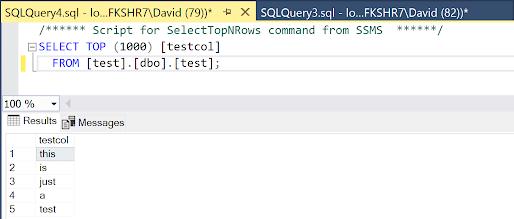
Once ran I'm just going to run a quick select query on my super imaginative test table: 


In order to create a suitable test scenario I'm going to cause some blocking within SQL Server by starting a transaction on my test table without committing or rolling it back and when I execute the query I receive the message telling me 1 row has been affected so it looks like the query has finished:


However the transaction is now in a sort of limbo land waiting for me to commit it or roll it back. Now I'm going to re-run my previous select statement and whilst the query starts I can see from the tab that it is "stuck" executing:


What is actually happening here is my update statement which is still in an open transaction is blocking my select statement. This is because by default SQL Server will only let me query and read committed rows so until my update transaction is completed the select won't finish either.

Now I'm going to check the wait statistics of my instance and to narrow things down a little I'm going to just look for wait types starting LCK that are to do with blocking and as you can see from the image below there are no waiting task counts or wait times associated with any blocking, which is untrue because we can see the tab is still showing as executing:


I'll now go back to my update statement and roll it back using ROLLBACK TRAN and when I do my select statement that was stuck executing will immediately return the result (which would occur whether I rollback or commit). When I rerun my wait stats query I know see the top wait LCK_M_S with a wait_time_ms of 649138.


As well as been a cumulative value the sys.dm_os_wait_stats DMV, and to quote the official description: "Returns information about all the waits encountered by threads that executed." It states threads that executed, not that are currently executing/waiting.

Whilst sys.dm_os_wait_stats can give us a good indication of how a server has been performing overall for real time troubleshooting it may not be the right level of diagnosis that we need and instead of looking at cumulative server wait statistics we need to go a little deeper into the task layer to get a much better picture of what is happening at that moment and we'll cover that in a forthcoming post!

Saturday, February 20, 2021

(NON-SERIOUS) The Not So Pro Guide to SQL Server Wait Statistics

The following guide to SQL Server wait statistics (as seen in the sys.dm_os_wait_stats DMV) is complete jibberish. It should not be taken seriously under any circumstances and if followed on a production environment don't mention my name. In fact blame Derek.

Please!! DO NOT DO any of this, it's a joke (it's barely that to be fair).


ASYNC_NETWORK_IO

Asynchronously blame the network and storage teams for not upping their game. 

CXPACKET

Attempt to pronounce parallellellellellism correctly then set MAXDOP to 1.

PAGELATCH

Mention TempDB and contention in the same sentence. Delete TempDB

BACKUP_

Delete any long running backup jobs. If wait persists then delete all backup jobs.

PAGEIOLATCH

Point menacingly at storage team, shout IO and YOUR FAULT a lot. Double server RAM when nobody is looking and set SQL Server Max Memory to 2147483647.

LCK_

Well documented issue that is only truly resolved by adding NOLOCK to all queries. Often a less seasoned SQL Server professional will try to advise that this is bad practice. Smile politely, tell them they're too pessimistic and ignore them. Send an email welcoming all stakeholders to the turbo times.

HADR_

Migrate all currently implemented HADR solutions to use merge replication.

IO_COMPLETION

Databases are way too big, shrink them. Occasionally databases won't shrink, this is a known issue that can be resolved by removing all indexes.

DATABASE MIRRORING_

See HADR_ wait

PREEMPTIVE_OLEDBOPS

It's not a wait type, it's a movement. 

OLEDB

Someone has set the OLE database to single user mode or in business critical conditions the OLE database does not exist and urgently requires adding to the instance.

SOS_SCHEDULER_YIELD

Very common wait type indicating that available CPU resource is lame. Immediately quadruple the current amount of CPU's. If using enterprise edition then double again to maximise gains.

MSQL_XP

Non valid wait. Your stored procedures are so awesome they've been awarded XP points.

PWAIT_GWPROXYCONN_PENDINGQUEUE_RWLOCK

Install Welsh language pack.

QDS_HOST_INIT

Clearly it's the QDS host, innit. 

RESOURCE_SEMAPHORE

Widely considered as the too much hassle wait. Tell anyone that asks that you recently read online that memory grants are particularly slow at this time of year and it should pick up in the summer when you migrate to the cloud.

CXCONSUMER

Well documented bug in SQL Server 2017; install Service Pack 33.

THREADPOOL

Check max worker threads for default value of 0 and promptly set to 1.

TESTTHREAD

Locate whoever is testing in production and tell them to stop, unless it's cursors.

WRITELOG

Set all databases to simple recovery. Stop SQL Server and delete all transaction log files as you don't them anymore. 

SLEEP TASK

AKA the wakey wakey wait, schedule a restart of SQL Server during the next team meeting.

Tuesday, January 12, 2021

Field Notes: SQL Server Replication


Field Notes - SQL Server Replication

This post is not a how to guide about replication. 

For this post I am trying something a little different. I've used replication in the past, recently I've spent a bit more time with it and I've got to be honest I'm now slightly more in favour of using it than I was before (I said slightly). This post is a collection of notes; things that I've tried, some of the problems that I have ran into and general thoughts. There's a lot of links to some really useful information out there (which is where you'll find the how-to stuff - such as the replication tutorials from Microsoft).

From the off, it goes without saying but I'll say it anyway; whatever you do in replication don't let the first time you try it out be in a production environment - it will end in disaster, I personally guarantee it!!

Accurate Replication Diagram

Replication is both extremely configurable and at times a seriously complex topic. Ideally you need a blank development canvas to setup replication systems on from scratch as well as a test system that resembles your production replication topology as closely as possible (and yes, that means clusters, AG's whatever).  I learnt very quickly that replication goes way beyond copying a table from A to B rather quickly and can often leave a system resembling the image above - so having the opportunity to try everything out in isolation a prior to production is a priceless benefit. Right, on with the notes:

Snapshot Initialisation Options

A problem came when we needed to rebuild the entire replication setup using the same databases. We couldn't reinitialise from a new snapshot so instead setup the subscription using the 'replication support only' option. When using this option the export and import of snapshot data is skipped and only replication support stored procedures and triggers are created at the subscriber before data synchronisation starts. 

The critical point when using this option is to ensure that the schema between publisher and subscriber match and that data is completely up to date in the subscriber as only changes from the start of synchronisation are replicated (see Subscription DML Errors further down for potential issues). Another option to reduce the impact of a large snapshot is to initialise with a database backup instead; here's a handy guide on how to do that.

Be aware though that non-sync subscription options such as replication support only also prevent the subscription from being reinitialised at any point; should the subscription expire for example then the subscription would need dropping and recreated.

Full Snapshots When Adding Tables - Immediate Sync Option

By default subscriptions are created with the immediate sync option equal to true, a downside to using this option occurs when adding a new table to a publication as it requires generation of the entire snapshot. Depending on database and publication size this can be an extremely long winded process. Setting the immediate sync option to false means a snapshot is only created for the new table when the snapshot agent is ran significantly reducing the size, resource cost of course and time for snapshot generation; more information here.

An alternative approach is to use multiple publications within the same published database, which I will cover shortly.

Trimming Down Publications

It's very easy to publish all tables to a subscriber, in fact it's quite common to see that approach but the obvious problem here is replicating way too much data than what you actually need. A trimmed down publication containing only what is required can provide significant performance improvements, particularly where snapshots are concerned (as well as being rather obvious best practice advice).

Similarly performing needless update operations on a published database can in turn cause those same needless operations to be replicated across to its subscribers.

Trimming down doesn't just apply to data though. Publications are also seriously configurable; objects such as the individual columns, foreign and unique key constraints, partitioning schemes, permissions and so much more can be replicated (or not) along with their respected tables and data. 

Both clustered and nonclustered indexes can be replicated to a subscriber (as well as spatial, full text and nonclustered columnstore). Indexes though can get very large and replicating them comes at a cost, a cost which if the index isn't used at the subscriber will be a total waste so consider disabling the replication of certain objects if they are not required. Here's an overview of article properties to get you started.

Publications can even take advantage of filters, essentially a where clause on the replicated object which can further minimise the footprint of a publication. This can be a really useful not just for performance reasons but also as a design consideration, particularly where multiple subscribers are present that could have their relevant data split out and filtered into separate publications, again the pros and cons to any design need weighing up. 

Remember it's much easier to carefully plan replication at the beginning of an implementation than it is to start making lots of changes once it is in place. Understanding (and sticking to) the exact requirements (and knowing the limitations) can often avoid problems later down the line.

Multiple Publications - Other Examples

It's common to split up publications into logical groups of objects, not just of object types. Again it is a design consideration; as an example, perhaps certain objects only need infrequent synchronisation so can be placed in a separate publication and scheduled accordingly. Large objects can also be put into their own publications 

Another configurable option within replication is command types; I have worked on systems where delete commands are not replicated to their archive subscriber databases. This works well but isn't without potential issues (as I'll mention soon). Whilst these command configurations can be made at the article layer it's another potential opportunity to split out a group of published data.

Just bear in mind that splitting out published data creates lots more to do; more publications means more agents, jobs, and data considerations - whilst it is possible it is advised not to include the same objects in multiple publications for performance reasons.

Distribution Performance - Indexing

Replication uses a lot of system tables to keep track of everything that is going on and the distribution database can get very busy, often the underlying system queries can be improved by implementing additional indexes within the distribution database. Here's a great post from Phil Grayson containing a script that I have implemented numerous times. I highly recommend treating the distribution database as you would any other and monitor for poor performance, particularly at the query layer.

Large Updates Causing Blocking (Merge Replication) - Generation Leveling Threshold

When you add large batch updates into the mix along with merge replication things can start to slowly grind to a halt with a common symptom being merge agents appearing to be in a hung state. 

In my experience I've seen issue show up with long blocking chains being present involving system tables such as MSmerge_tombstone and MSmerge_genhistory. One option is to alter the publications generation_leveling_threshold setting which alters the group size of replicated transactions and greatly improve the performance of merge synchronization; here's a link with more informationAlso worth noting, the website linked to is bloody marvelous for replication guidance - bookmark it.

Flexibility Over Availability Groups

This one is a little bit of a shocker for me to say; in some ways I actually prefer replication over Availability Groups! AG's can be a pain to manage but one of my biggest problems with them is the lack of flexibility when it comes to readable replicas, because basically there isn't any. 

Using transactional replication means I can take of advantage of being able to create and use additional objects at the subscriber database (which I cannot do in AG's). Subscriber workloads tend to be different to the workloads on the publisher, different workloads mean different queries and that means I can do things like use completely different indexing strategies at the subscriber (even better if I've already trimmed down the excess).

Flexibility in the subscriber database is great, but there are some things to think about...

Subscriber Performance Considerations

I mentioned differing workloads and a typical example setup of a transactional publisher replicating to a subscriber used for reporting purposes. Subscriber performance can often be overlooked but is equally critical to publisher and distribution performance because it can have a direct affect on replication. 

This is a really important consideration for me; treat a replication topology as a whole system, not individual parts. They can all impact one other, and often do, so should be monitored and subsequently tuned accordingly.

A common scenario that I have seen is larger reporting queries (heavy selects) being ran on the subscriber blocking replication update commands. These are reported in replication monitor as query timeouts (no activity for 10 minutes) but often this error indicates issues at the subscriber. Replication is then queued up until the block resolves, for significant duration this then causes a delay whilst replication catches up. 

Kendra Little wrote a fantastic replication tuning checklist covering lots of performance considerations. One of the mentions was about using RCSI at the subscriber database; I can't say at the time of writing that I have used in production yet but is definitely something I will be exploring on new implementations.

Subscriber DML Errors - Row was not found at the subscriber

Earlier I mentioned the replication support only subscription option which relies on the data already being in sync between publisher and subscriber. If the data is not in sync, for example down to publisher database activity not being stopped then we can run into replication DML errors such as attempting an update on a row that doesn't exist (which can also happen if rows are deleted from the subscriber database directly, so remember to apply sensible permissions).

At first these errors can be difficult to diagnose because the issue isn't obvious in replication monitor. It will inform us that an error has occurred with an error message such as 'The row was not found at the subscriber when applying the replicated command' along with a transaction sequence number (the really important bit), so you'll need to get familiar with...

sp_browsereplcmds

In order to find the actual error we need to run sp_browsereplcmds using the transaction sequence number for the @xact_seqno_start and @xact_seqno_end parameters (here's a working example) to retrieve the command in error. This command is definitely one to get familiar with.

MSrepl_errors

In the above example the sequence number is visible in replication monitor but sometimes certain errors do not expose the sequence number in the visible error text. In this case there is system table in the distribution database named MSrepl_errors which can be sorted by the time column to find the latest errors. There can be a lot of noise in this table but by using the time and error_text details you can normally locate the problem and then use the corresponding xact_seqno value with sp_browsereplcmds as you would in the example above.

Replication in Availability Groups

If you're using SQL Server 2016 or greater then you can place the distribution database in an Availability Group and then when setting up publishers use the appropriate AG listener. However, this works fine UNLESS you're using merge, bi-directional or peer to peer replication, then it won't work fine...well it won't work at all!

Publishers can also be setup in Availability Groups although rather than set them up directly within an Availability Group they must be setup on the primary replica first and then create a publisher redirect on the distribution database pointing to the Availability Group listener. During failover from the primary replica replication will then be rerouted to the listener keeping it available.

Subscribers to transactional replication can also be setup within Availability Groups. When setting up the subscription ensure that the listener name is used rather than the actual server name. There is a difference though when using push or pull subscriptions; push requires no additional action but when using pull subscriptions you must manually create the distribution agent job on secondary replicas and for future failovers handle enabling and disabling the jobs on the old and new replicas.

Replication in Azure Managed Instances

Worth a mention; replication is supported by Azure Managed Instances. You can't use merge replication, or peer-to-peer or updateable subscriptions but for transactional and snapshot replication it's supported. 

I did have some fun and games setting it up. The initial issues were down to Azure port permissions on the file share that needs to be used for the snapshot folder (Azure MI was distributor and publisher). I also found any modifications to be much smoother when using T-SQL rather than SSMS.

Another issue was a problem encountered when setting up a new publication on a database restored to the managed instance from an older version of SQL Server which was failing due to a 'column does not allow nulls. INSERT fails' error on a system table (IHPublications).

In this case the database was already being used in replication so when restored I suspect the system tables came along with it. On the original SQL Server instance the column did not allow NULL values which add publication process on the managed instances was trying to add. Following the guidance in this article all system objects were dropped and then the publication was successfully created.

Push and Pull Subscriptions - Reading the Documentation!

Primarily the difference between push and pull subscriptions is where the distribution agent resides; for pull subscriptions the job runs on the subscriber and for push it runs on the distributor. In larger scale setups using a higher number of push subscriptions performance issues can occur on the distribution server (which can then cause issues on the entire replication system) so when using a large number of subscribers pull subscriptions should be considered. There are further considerations when replicating over a WAN; here's a useful article which also contains a handy tip on manually copying a snapshot to a subscriber.

As mentioned previously in the Availability Group section there are additional considerations when using push and pull subscriptions. Often there can be subtle differences between the types when initially setting them up, making modifications to them or even when removing. In all Microsoft provides pretty good documentation when it comes to the various replication activities.

SQL Server Updates & Version Compatibility

According to Microsoft SQL Server fully supports upgrading databases used in a replication topology, however there are some rules you have to follow:

  • Distributor version must be greater than or equal to the Publisher
  • Publisher must be equal to or less than the Distributor
  • Transactional subscribers can be within two versions of the Publisher
  • Merge subscribers can be all versions equal to or below the Publisher
However; I've found that in some circumstances whilst setting up subscribers in Management Studio fails due to version incompatibility I have been able to set them up without any issue when using T-SQL - I assume it's not supported so still definitely not recommended

Patching

Upgrading SQL Server instances in a replication topology does require planning and a without doubt a rehearsal (or a few) on a test system, including a rollback plan. As well as compatibility considerations there are other steps relating to replication that require adding to the outage plan such as stopping user activity and running replication agent jobs. This guide from Microsoft covers the necessary steps. It is recommended to perform updates to the distributor first, then publishers followed by subscribers (although for in-place upgrades the publisher and subscribers can be in any order I prefer to keep the process consistent). 

Republishing Data

Replication can also be setup in what is known as a republishing topology; this basically means that a subscriber can also act as publisher  (the data it receives in a subscription is also published to another subscriber).

There are a things you can and cannot do and supported scenarios; here's the official Microsoft documentation on the topic. I found this a really useful option when migrating a very large and busy replication topology to a new system with zero downtime. 

Removing Replication

Finally, one major thing I have learned is that whilst replication can be fairly straightforward to setup it can be a real pain to remove. A classic example when trying to remove a publication is to receive a primary key violation error and then when trying to remove said primary key (or it's related table) you then receive a cannot remove as it's used in replication error, it's a brilliant catch-22 scenario.

In this case publication often needs disabling at the database level by using sp_replicationdboption setting @optname = N'publish' to false and then proceeding to drop the publication. This command though is at the database level - not just a single publication

If all else fails and replication is still hanging back there is a fall back option, sp_removedbreplication which when ran on the publisher or subscriber database will remove all related replication objects. Just remember to manually remove any related SQL Agent jobs from the distributor afterwards.

For now that is all, I'm sure I'll be making edits, updates and additions to this post in the future but if you are working with replication hopefully it's been of some use and pointed you in some useful directions. Replication is a complex technology but I'd also argue it's incredibly robust and flexible in some ways too. Until next time!

Tuesday, October 13, 2020

T-SQL Tuesday 131 - Data Analogies, or: Explain Databases Like I’m Five!


I have a habit of coming up with intriguing titles for sessions before I actually come up with any content. Last year I came up with Guillotines, Sat-Nav and the Query Optimiser and then had the challenge of tying it all together somehow. This months T-SQL Tuesday topic (#131) comes by the way of it's rather fantastic host Rob Volk and it gives me a great opportunity to describe the session because...

This month we’ll explore analogies, or how would you explain database concepts to someone who’s not technologically savvy.

Guillotines = execution but what I did find out whilst I was conducting minutes of research in Wikipedia was that the guillotine was put together by a dream team of a doctor and harpsichord maker to provide a much quicker (and more humane) execution compared to a big old axe. In terms of SQL Server that is exactly what the query optimiser is designed to do, give the most optimal execution (and I suppose in a way much more humane too).

The optimiser does this by using all kinds of magic to come up with an execution plan. What's an execution plan I hear you shout? If you haven't shouted it then please do it as loud as possible, you'll feel great. Well, with a bit of imagination it's a bit like Satellite Navigation...which helps massively for the session title.

We don't tell the query optimiser how to do things. We ask it very nicely for the results we want and because we've asked nicely it determines what is probably the best way of doing it in the form of an execution plan (which it shoves over to the execution engine) and most of the time it does a splendid job too.

This plan is just like having a set of directions and basically it will tell the execution engine exactly what to do. It's just like when we ask sat-nav how to get from A to B via C avoiding toll roads (which is always, I'm from Yorkshire) the execution plan contains the instructions for things like how to join this and that table to whatever table etc etc.

There's a whole load of phases and stages and other stuff to explain but for now, execution plan = directions. I'll stick with the theme (because now I'm on a roll) to describe trivial plan optimisation. You wouldn't use sat-nav to give someone directions to the top of your street would you? No. It's too much hassle and also it's blinking obvious. Well the optimiser won't bother with the hassle of full optimisation if there's one straightforward obvious way of executing your query either and will use a trivial plan instead. It saves effort, a bit like my kids when I ask them to do ANYTHING.

Want more analogies? Sure. If you're like me you'll occasionally think that you know better than satellite navigation and take the directions into your own hands. This might work now and again but most of the time it just takes longer. Query hints. This is exactly what is going on here, you're overruling sat-nav and using the B1263 country road because it was faster last month only to get stuck behind a tractor.

One more? Go on then. Speaking of sat-nav; have you ever noticed sat-nav not telling you to use the brand new bypass that cuts right through the middle of the nearest picturesque village? That's because if the maps aren't up to date it doesn't know the road is there. In a much similar way this is why you should keep SQL's statistics up to date, having up to date information helps inform the optimiser to make better decisions when coming up with optimal directions.  

Make sense?

OK I'm seriously out of ideas now but as if by incredible timing I have just recently published a rehearsal recording of my guillotines session on my brand spanking new YouTube channel. Here you see checking word order is very important; my brand new spanking channel could have been something rather embarrassing.

Anyway, I've got sidetracked, here's the link to a rehearsal of Guillotines, Sat-Nav and the Query Optimiser if you'd like to know more about guillotines, because you really should, there's even a quiz! Oh and there's some other optimiser stuff too.

Thanks for reading!

Friday, September 11, 2020

DP-900 Microsoft Azure Data Fundamentals - Exam Prep


As promised in my last post after passing the DP-900 Azure Data Fundamentals exam here's my exam preparation guide which provide links to the various resources I used in studying for the different topics.

DESCRIBE CORE DATA CONCEPTS (15-20%)

Describe types of core data workloads

Describe batch data:

https://www.talend.com/resources/batch-processing/

https://docs.microsoft.com/en-us/azure/architecture/data-guide/big-data/batch-processing

Describe streaming data:

https://hazelcast.com/glossary/stream-processing/

Describe the difference between batch and streaming data:

https://docs.microsoft.com/en-us/learn/modules/explore-core-data-concepts/4-describe-difference

Describe the characteristics of relational data:

https://docs.microsoft.com/en-us/learn/modules/explore-core-data-concepts/3-identify-types-storage

Describe data analytics core concepts

Describe data visualization (e.g., visualization, reporting, business intelligence (BI)):

https://powerbi.microsoft.com/en-us/data-visualization/

Describe basic chart types such as bar charts and pie charts:

https://www.klipfolio.com/resources/articles/what-is-data-visualization

Describe analytics techniques (e.g., descriptive, diagnostic, predictive, prescriptive, cognitive):

https://docs.microsoft.com/en-us/learn/modules/data-analytics-microsoft/2-data-analysis

https://www.weirdgeek.com/2018/11/types-of-analytics/

Describe ELT and ETL processing:

https://www.talend.com/resources/elt-vs-etl/

Describe the concepts of data processing;

https://www.mbaknol.com/management-information-systems/concept-of-data-processing/


DESCRIBE HOW TO WORK WITH RELATION DATA ON AZURE (25-30%)

Describe relational data workloads

Identify the right data offering for a relational workload:

https://docs.microsoft.com/en-us/azure/architecture/guide/technology-choices/data-store-overview

Describe relational data structures (e.g., tables, index, views):

https://web.csulb.edu/colleges/coe/cecs/dbdesign/dbdesign.php?page=sql/views.php

Describe relational Azure data services

Describe and compare PaaS, IaaS, and SaaS delivery models:

https://www.bmc.com/blogs/saas-vs-paas-vs-iaas-whats-the-difference-and-how-to-choose/

https://docs.microsoft.com/en-us/learn/modules/principles-cloud-computing/5-types-of-cloud-services

Describe Azure SQL Database:

https://azure.microsoft.com/en-gb/services/sql-database/

Describe Azure Synapse Analytics:

https://azure.microsoft.com/en-gb/services/synapse-analytics/

https://docs.microsoft.com/en-us/learn/modules/examine-components-of-modern-data-warehouse/3-explore-azure-data-services-warehousing

Describe SQL Server on Azure Virtual Machine

https://docs.microsoft.com/en-us/azure/azure-sql/virtual-machines/windows/sql-server-on-azure-vm-iaas-what-is-overview

Describe Azure Database for PostgreSQL, Azure Database for MariaDB, and Azure Database for MySQL:

https://docs.microsoft.com/en-us/learn/modules/explore-relational-data-offerings/6-postgresql-mariadb-mysql

Describe Azure SQL Managed Instance:

https://docs.microsoft.com/en-us/azure/azure-sql/managed-instance/sql-managed-instance-paas-overview

Identify basic management tasks for relational data

Describe provisioning and deployment of relational data services:

https://docs.microsoft.com/en-us/learn/modules/explore-provision-deploy-relational-database-offerings-azure/4-describe-provision-postgresql-mysql

Describe method for deployment including the Azure portal, Azure Resource Manager templates, Azure PowerShell, and the Azure command-line interface (CLI):

https://docs.microsoft.com/en-us/learn/modules/deploy-azure-sql-database/3-deploy-single

Identify data security components (e.g., firewall, authentication):

https://docs.microsoft.com/en-us/learn/modules/explore-provision-deploy-relational-database-offerings-azure/5-configure-relational-data-services

Identify basic connectivity issues (e.g., accessing from on-premises, access with Azure VNets, access from Internet, authentication, firewalls):

https://docs.microsoft.com/en-us/azure/azure-sql/database/troubleshoot-common-errors-issues

https://medium.com/@vmehmeri/troubleshooting-connectivity-in-microsoft-azure-2035c7a43d3f

Identify query tools (e.g., Azure Data Studio, SQL Server Management Studio, sqlcmd utility, etc.):

https://docs.microsoft.com/en-us/sql/azure-data-studio/what-is?view=sql-server-ver15

https://docs.microsoft.com/en-us/sql/ssms/sql-server-management-studio-ssms?view=sql-server-ver15

https://docs.microsoft.com/en-us/sql/ssms/scripting/sqlcmd-use-the-utility?view=sql-server-ver15

https://code.visualstudio.com/

Describe query techniques for data using SQL language

Compare DDL versus DML:

https://docs.microsoft.com/en-us/learn/modules/query-relational-data/2-introduction-to-sql

https://stackoverflow.com/questions/2578194/what-are-ddl-and-dml

Query relational data in PostgreSQL, MySQL, and Azure SQL Database:

https://docs.microsoft.com/en-us/learn/modules/explore-relational-data-offerings/6-postgresql-mariadb-mysql

https://azure.microsoft.com/en-gb/blog/fast-and-easy-dev-with-azure-db-for-mysql-and-azuredb-for-postgresql/?WT.mc_id=DOP-MVP-5003451


DESCRIBE HOW TO WORK WITH NON-RELATIONAL DATA ON AZURE (25-30%)

Describe non-relational data workloads

Describe the characteristics of non-relational data:

https://docs.microsoft.com/en-us/azure/architecture/data-guide/big-data/non-relational-data?WT.mc_id=DOP-MVP-5003451

Describe the types of non-relational and NoSQL data:

https://azure.microsoft.com/en-gb/overview/nosql-database/

Recommend the correct data store:

https://docs.microsoft.com/en-us/azure/architecture/data-guide/technology-choices/data-storage

Determine when to use non-relational data:

https://azure.microsoft.com/en-gb/overview/nosql-database/

https://docs.microsoft.com/en-us/azure/architecture/data-guide/technology-choices/data-storage (capability matrices)

Describe non-relational data offerings on Azure

Identify Azure data services for non-relational workloads:

https://docs.microsoft.com/en-us/learn/modules/explore-non-relational-data-offerings-azure/

https://docs.microsoft.com/en-us/azure/architecture/data-guide/technology-choices/data-storage

Describe Azure Cosmos DB APIs:

https://docs.microsoft.com/en-us/learn/modules/choose-api-for-cosmos-db/

https://nordcloud.com/azure-cosmos-db/

Describe Azure Table storage:

https://docs.microsoft.com/en-us/learn/modules/explore-non-relational-data-offerings-azure/2-explore-azure-table-storage

Describe Azure Blob storage:

https://docs.microsoft.com/en-us/learn/modules/explore-non-relational-data-offerings-azure/3-explore-azure-blob-storage

Describe Azure File storage:

https://docs.microsoft.com/en-us/learn/modules/explore-non-relational-data-offerings-azure/4-explore-azure-file-storage

Identify basic management tasks for non-relational data

Describe provisioning and deployment of non-relational data services:

https://docs.microsoft.com/en-us/learn/modules/explore-provision-deploy-non-relational-data-services-azure/

Describe method for deployment including the Azure portal, Azure Resource Manager templates, Azure PowerShell, and the Azure command-line interface (CLI):

https://docs.microsoft.com/en-us/learn/modules/explore-provision-deploy-non-relational-data-services-azure/

Identify data security components (e.g., firewall, authentication, encryption):

https://docs.microsoft.com/en-us/learn/modules/explore-provision-deploy-non-relational-data-services-azure/5-describe-configure-non-relational-data-services

https://cloudacademy.com/course/configuring-azure-application-and-data-security/configuring-cosmos-db-security/

Identify basic connectivity issues (e.g., accessing from on-premises, access with Azure VNets, access from Internet, authentication, firewalls)

https://docs.microsoft.com/en-us/learn/modules/explore-provision-deploy-non-relational-data-services-azure/5-describe-configure-non-relational-data-services

Identify management tools for non-relational data:

https://docs.microsoft.com/en-us/learn/modules/explore-non-relational-data-stores-azure/


DESCRIBE AN ANALYTICS WORKLOAD ON AZURE (25-30%)

Describe analytics workloads

Describe transactional workloads:

https://docs.microsoft.com/en-us/azure/architecture/data-guide/relational-data/online-transaction-processing

Describe the difference between a transactional and an analytics workload:

https://www.guru99.com/oltp-vs-olap.html

Describe the difference between batch and real time:

https://www.datasciencecentral.com/profiles/blogs/batch-vs-real-time-data-processing

Describe data warehousing workloads:

https://docs.microsoft.com/en-us/learn/modules/explore-data-ingestion-azure/

https://docs.microsoft.com/en-us/azure/synapse-analytics/sql-data-warehouse/sql-data-warehouse-workload-classification

Determine when a data warehouse solution is needed:

https://docs.microsoft.com/en-us/azure/architecture/data-guide/relational-data/data-warehousing#:~:text=These%20steps%20help%20guide%20users,transaction%20systems%20for%20performance%20reasons.

Describe the components of a modern data warehouse

Describe Azure data services for modern data warehousing such as Azure Data Lake, Azure Synapse Analytics, Azure Databricks, and Azure HDInsight:

https://docs.microsoft.com/en-us/learn/modules/examine-components-of-modern-data-warehouse/3-explore-azure-data-services-warehousing

https://azure.microsoft.com/en-gb/solutions/data-lake/

https://azure.microsoft.com/en-gb/services/databricks/

Describe modern data warehousing architecture and workload:

https://www.jamesserra.com/archive/2014/12/the-modern-data-warehouse/#:~:text=A%20modern%20data%20warehouse%20consists,%2C%20MapReduce%20tools%2C%20and%20HDFS.

https://docs.microsoft.com/en-us/learn/modules/examine-components-of-modern-data-warehouse/

https://docs.microsoft.com/en-us/azure/synapse-analytics/sql-data-warehouse/sql-data-warehouse-workload-importance

Describe data ingestion and processing on Azure

Describe common practices for data loading:

https://docs.microsoft.com/en-us/learn/modules/explore-data-ingestion-azure/2-describe-common-practices-for-data-loading

https://www.xplenty.com/blog/etl-vs-elt/#:~:text=ETL%20stands%20for%20Extract%2C%20Transform,the%20need%20for%20data%20staging.

Describe the components of Azure Data Factory (e.g., pipeline, activities, etc.):

https://www.cathrinewilhelmsen.net/2019/12/03/overview-azure-data-factory-components/

https://docs.microsoft.com/en-us/learn/paths/data-integration-scale-azure-data-factory/?WT.mc_id=DP-MVP-5001430

Describe data processing options (e.g., HDI, Azure Databricks, Azure Synapse Analytics, Azure Data Factory):

https://docs.microsoft.com/en-us/learn/modules/examine-components-of-modern-data-warehouse/3-explore-azure-data-services-warehousing

Describe data visualization in Microsoft Power BI

Describe the role of paginated reporting:

https://docs.microsoft.com/en-us/power-bi/paginated-reports/paginated-reports-report-builder-power-bi

Describe the role of interactive reports:

https://powerbi.microsoft.com/en-us/desktop/

Describe the role of dashboards:

https://docs.microsoft.com/en-us/power-bi/create-reports/service-dashboards#:~:text=A%20Power%20BI%20dashboard%20is,tells%20a%20story%20through%20visualizations.&text=Dashboards%20are%20a%20feature%20of,available%20in%20Power%20BI%20Desktop.

Describe the workflow in Power BI:

https://docs.microsoft.com/en-us/learn/modules/get-started-with-power-bi/3-building-blocks-of-power-bi


Thursday, September 10, 2020

Passed! DP-900 Microsoft Azure Data Fundamentals - Overview

Today I passed the Microsoft Azure Data Fundamentals exam (DP-900) and this post is going to be a quick overview of how I prepared, links to some of the training material I used and general thoughts. I'll publish a more comprehensive exam prep guide very soon.

As the name clearly states this is a fundamentals exam and whilst I'd say that the exam content isn't particularly deep at a technical level it does cover a broad range of content so without a doubt it definitely requires putting some work in.

To start, here's the official link for the exam page. This page will highlight any upcoming changes to the exam material (currently scheduled 22/10), you can schedule the actual exam here and most importantly for the purpose of studying see the skills measured and download the exam outline.

The skills measured show the percentage breakdown of exam topic material; at the time of writing it is as follows:

  • Describe core data concepts (15-20%)
  • Describe how to work with relational data on Azure (25-30%)
  • Describe how to work with non-relational data on Azure (25-30%)
  • Describe an analytics workload on Azure (25-30%)

Already we can see a split between concept based questions and then workload based which is broken down between relational and non-relational data in Azure as well Analytics. The exam outline link gives us much more information on what data topics are covered so definitely have a read through. Very important, the link allow highlights forthcoming changes so make sure you check those if you're planning on taking the exam after the changes are implemented.

Going back to the exam page under the skills measured we can see the exam preparation options; either instructor led (not covered) or online via the Microsoft Learn platform. Directly from this course page we have [completely free] learning material broken into four learning paths for each of the Azure Data Fundamentals skills areas. 

Each learning path is further broken down into a number of modules of material which will be text based content explaining concepts, some videos and perhaps the most useful feature of Microsoft Learn, hands-on exercises aka learn by doing, which make use of a Microsoft Azure sandbox so you can really get stuck into actually using the different solutions. At the end of each module you get a knowledge check which is a couple of multiple questions before a summary.

For the exam, the exercises definitely need completed so you can understand how things are setup and how things work. In addition, I seriously recommend the further official documentation material that is linked to on each module summary. Although it's a fundamentals exam, it definitely helps to understand some of the detail. 

I do need to give two shout outs; Gregor Suttie for his exam prep guide for DP-900 and John Savill for his exam prep whiteboard video. Right now my normal training providers don't have courses running for DP-900 so I've also been using material from the DP200 and DP201 exams which I will doing next, of course they're a little deeper.

So there's a whole bunch of links to get you started if you're looking at taking the DP-900 Azure Data Fundamentals exam. Overall it was pretty straightforward, I got a really good score which I am delighted with and I will post up a much more comprehensive study guide pretty soon.

Thanks for reading and good luck!

Breaking up with SQL Server

I was inspired to write this after reading a post from Dave Mason regarding breaking up with Big Tech companies. Yet again I haven't wr...